
Two friends socializing in front of real estate building

Project Planning | Development Management

The Planon Real Estate software for project developers provides you with optimum support for the financial planning of your real estate projects and provides valuable decision-making aids.

Investment Planning & Dynamic Project Evaluation

Software management indexation sales value method
The analysis of investment costs and returns is based on the standard principles of property calculation. The development management software determines these values using predefined standard values (defaults), which you can further specify as required. The default cost items include land costs, construction costs and ancillary costs. The detailed cost structure can be flexibly customised and configured according to your individual requirements.

In order to determine and continuously monitor the financial feasibility of the project, the software provides various result and return ratios. The following items can be calculated as required:

  • Purchase costs for land and/or storage
  • Construction costs
  • Development profit
  • Rental income
  • BAR (operating and acquisition costs)
  • Purchase amount

The development management software follows a clear structure for setting up projects. Each project consists of at least one variant and one type of utilisation. Those types of utilisation can be, for example, residential, parking or retail.

Within the type of utilisation, a distinction is made between former types: For example, the type of utilisation “Residential” includes terraced houses, rented flats and semi-detached houses, while the type of utilisation “Parking” is divided into types such as underground car parks and above-ground car parks. This structured approach enables precise planning and classification of projects.

An outstanding feature of the software is the dynamic calculation method. In many feasibility analyses, an estimate is first made of the costs and revenues, with the delta between the two giving the profit. In some cases, this value is adjusted by the financing costs.

The software works with cash flows and takes the time factor into account - for both costs and revenues. The daily calculation of the opposing flows results in the gross cash flow. This is cumulated to determine the capital requirement on a daily basis. In this way, the financing costs can be precisely determined. Only then does the software calculate the resulting profit.

FLEXIBLE STANDARD SOFTWARE WITH CUSTOMISATION FOR YOUR UNIQUE NEEDS

Adaptive Solutions

The Planon RE Development Management software solution offers a flexible cost structure that is based on the DIN 276 standard and thus creates a solid foundation for financial planning. At the same time, it enables customisation during the implementation process: additional cost lines can easily be added to reflect specific requirements.
The process structure can also be fully customised during the implementation process in order to be optimally adapted to the processes and needs of your company. In addition, you work with standard value libraries that can be customised and expanded based on your experience. This gives you a customised solution based on proven standards.

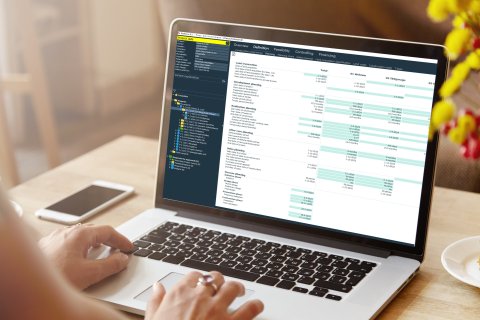
The cost structure of the development management software is based on the DIN 276 standard and is clearly organised into cost lines, cost groups and cash flow groups. In addition, the project developer's development profit is integrated into the total costs as a separate cost centre.

In addition to the classic investment costs, the software also takes into account other cost centres which, strictly speaking, are not included in the investment costs of a project. These include, for example, preliminary investigation costs, tenant fit-out or non-deductible input tax. Although these cost centres are not directly allocated to the investment costs, they are nevertheless an essential component of the total costs and are included in the calculation.

During the implementation of the software, you receive comprehensive support in designing your processes. The process planning is customised to the phases of your project. In addition, both mandatory and optional phase notifications can be set up to ensure transparent and structured planning.

In financial planning, this phasing allows you to allocate investments precisely over time. For example, 20% of the costs can be allocated to the preparation phase and 80% to the construction phase.

A workflow based on the 4-eyes principle ensures reliable checking: the project developer submits the planning, while the controlling department checks it and either approves or rejects it. All decisions are documented in the database, creating a detailed audit trail for each project.

For the initial determination of a project cost estimate, the development management software uses the key cost figures, indexing and cash outflow planning stored in the standard value set. These baseline values allow for a quick and accurate assessment of a project's financial framework.

The standard values library is based on your company's experience and can be customised. In this way, the values provide a solid basis for your project calculations and enable a customised solution that is optimally tailored to your company's specific needs. During implementation, experienced consultants are available to assist with the initial set-up of the Standard Value Library and ensure that all functionality is seamlessly integrated into your processes.

Cash Flow Control & Time-Based Indexing

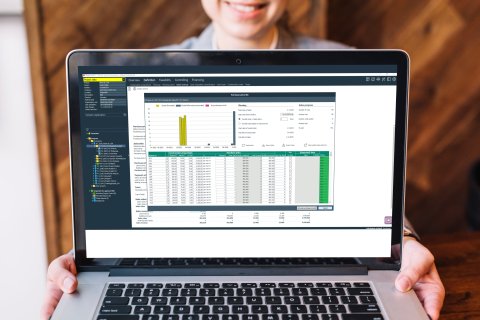
Software management gross cash flow graphic

Planon Real Estate Development Management Software offers comprehensive cash flow analysis capabilities that enable precise evaluation of the financial aspects of property projects.

  • Dynamic calculation
    The software calculates cash flows on a daily basis, taking into account time factors to accurately determine capital requirements and profit.
  • Integration of financing costs
    Financing costs are precisely included in the project evaluation through the exact calculation of capital requirements.
  • Flexible cost structure
    During implementation, company-specific cost centres can be added to the cost structure.
  • Consideration of time factors
    Temporal effects on cash flows are included in the calculations to enable a more realistic financial assessment

Software management indexation sales value method

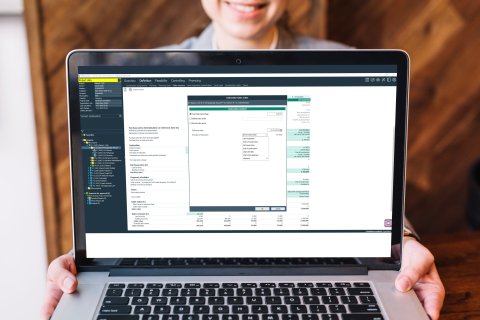
The dynamic calculation method is also evident in the indexing, which is important for the long-term planning of costs and revenues - especially if these will only be realised in a few years' time.
Indexing can be stored for various cost items, including:

  • Property value
  • Construction costs
  • Costs for technical installations
  • Outdoor facilities
  • Sales value

The ancillary construction costs are indexed indirectly, as they are mainly determined by a percentage of the land costs, construction costs or the sales price.

You can use the software to orientate yourself on a fixed key date. For example, if you received a valuation report on the expected sales proceeds of your project six months ago, you can include the sales value determined on that date in your planning.
Icon Energy & Sustainability Management.

Overview of performance

Track the progress of your projects in real time.

Track the progress of your projects in real time.

Cash flow forecasts

Plan future cash flows with precise, data-based forecasts.

Plan future cash flows with precise, data-based forecasts.

A road with two lanes splitting ahead.

Scenario analyses

Perform what-if and sensitivity analyses to evaluate different scenarios.

Perform what-if and sensitivity analyses to evaluate different scenarios.

From Completion to Sales: Residual Value Planning

You can enter values for both the key date and the date of completion of construction. However, it is important to note that all data is saved on the key date. For example, if you enter a contract value at the final value, this will be automatically indexed if the date is moved over the extension period. If this is not desired, for example because the indexation has already been settled, you can set the indexation to 0 % in advance.

If you create a project with residential units or car parks and select the ‘Purchase price’ or ‘Purchase price per m²’ valuation method, you can create a sales plan.

Software management purchase price list

The Building Management Software offers the option of creating a purchase price list for the ‘residential’ and ‘car park’ uses. In this list, you can define the specific purchase price, the exact living space, possible incentives, the sales value of the property, the status and the transfer date for each unit, among other things.

The purchase price list can be edited directly in the software or exported to Excel so that sales departments or external estate agents can also customise the list. As soon as the updated list is imported back into the software, it replaces the previous data and is adopted as the authoritative version.

Calculation method software management

In the software, the profit is shown as a cost line, which results in an equalisation amount that reflects the difference between costs and revenue. This compensation amount is then allocated to a residual value. By calculating the residual value, we mean adding the compensation to a residual value defined by the user. Possible residual values can be the land value, the construction costs, the sales value or the development profit.

If you are in a tender and would like to know the maximum property offer you can submit, the compensation is assigned to the property value. If all costs have already been determined, you can add the compensation to your profit.

Back to Back to module overview >>>